
Customer Portal | Help Center
Fast & Reliable
Welcome to the Customer Portal Help Center
This is where support happens fast, communication stays clear, and nothing falls through the cracks. Submit tickets, track progress in real time, upload large service files, and communicate directly with your assigned service technician.
All in one organized, transparent hub built to keep your machines running.
Help Center
Welcome to the Nota3D Family

Submit a Support Ticket
Get direct access to your assigned service technician. Submit tickets, upload large diagnostic files over 100MB, and track resolution in real time.
Response within 24 hours

Dedicated Account Support
Every customer gets a direct line to their assigned service technician through the Customer Portal. Submit tickets, upload files, track progress, and communicate in real time—all in one place.
Included with all service tiers

Customer Portal Access
Register in seconds and give your whole team visibility. Easily view your own tickets or your organization’s tickets, track closed tickets, and see updates quickly and efficiently.
Included with all service tiers
Support isn’t an afterthought. It’s part of the product. You invested in advanced additive technology. You deserve advanced support. Clear communication. Fast turnaround. No runaround. The Nota3D Difference
Portal Features
We Keep Your Support Running Smoothly

Qualified Service Technicians
Every ticket connects you directly to a Nota3D service expert.

Submit Tickets Anytime
Access your support dashboard 24/7 to submit tickets, upload files, and track progress.

Direct Technician Communication
Reply to your assigned service expert, attach files, and track updates in real time.

Secure & Confidential
All tickets, file uploads, and account data are protected.
Portal Guide
Navigation and Troubleshooting Tips
How It Works
Your Support Workflow, Simplified
Submit a ticket directly through the portal, upload service logs up to 100MB, and communicate with your assigned technician in real time.
Every update is tracked, documented, and visible. You spend less time waiting and more time running your equipment.
Start Here
My Account Navigation
Inside My Account, you’ll see:
- My Account (Homepage) – Your dashboard overview. Quick visibility into tickets, updates, and onboarding progress.
- Submit a New Ticket – Need help? Start here. You can also upload service log files over 100MB directly with your submission.
- Onboarding Hub – Everything you need to get up and running. Contacts, consumables, materials, welcome resources, and key documentation all in one place.
- Help (You’re here.)
- Sign Out - Sign out of your account and return to the Nota3d.com website
Portal Navigation
View & Manage Tickets
-
See all tickets you’ve submitted
-
Toggle between your tickets only or all tickets from your organization
-
Filter by status (Open, Waiting on Customer, Closed, etc.)
-
Track updates in real time
-
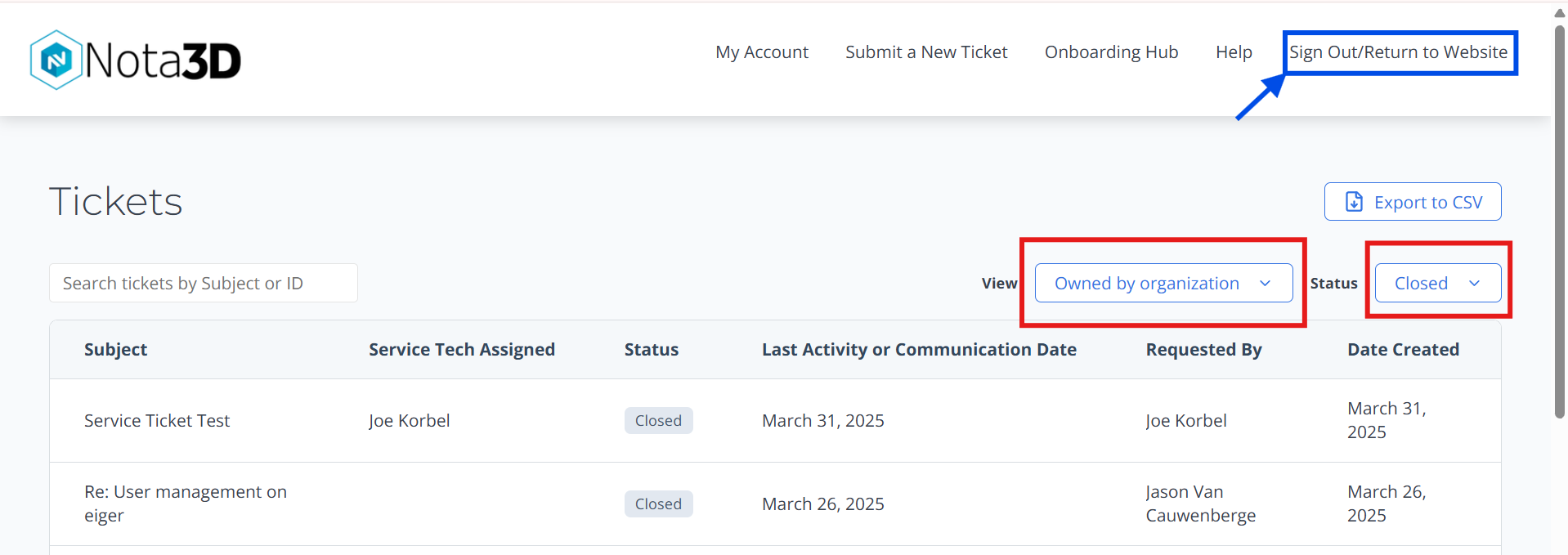
Use the Search Tickets feature at the top left to find tickets by keywords
-
Use the filters highlighted in RED to change views
-
Use the Top Menu Navigation to Submit New Tickets, Find the Onboarding Hub with direct contact information and links to our Ecommerce site, Advantage3D.com
-
Return to the Nota3D website by clicking the BLUE highlighted Sign Out/Return to Website button
What to Expect
After You Submit a Ticket
- Immediate confirmation in portal of ticket creation.
- A service technician assigned to your case within 24 hours.
- Clear communication through the portal. On-site needs scheduled promptly.
- Resolution steps and updates documented for your records.
We treat support like we treat manufacturing workflows: structured, efficient, and built to scale.
Inside each ticket, you can:
-
Reply directly to your technician
-
Attach additional files or images
-
Provide clarification or updates
-
See internal progress notes shared with you and your team
Upload Large Files
Yes, Even the Big Ones
Submitting diagnostic logs? Machine data? Massive files over 100MB?
We built the Submit a New Ticket page specifically to handle large service log uploads (find the button at the bottom of the form).
This brings you to a Google Form that you are able to attach any large file to. Just upload and go.
Your technician gets what they need, faster. That means faster troubleshooting and less downtime.
Onboarding Hub
Need Onboarding Help Instead?
If your question is about:
- Where to order consumables or materials
- Team contacts including sales and admin
- Welcome documentation and catch-all for helpful links
Head over to the Onboarding Hub.
That section is built to eliminate friction before it starts.